
















Introduction
A winter outing begins before you reach the trail.
You may leave a clear city street, drive into falling snow, and arrive at a trailhead with very different conditions. After the walk, traffic, a road closure, or a power cut at your accommodation may extend the day.
Preparing only for the hike leaves gaps in the rest of the journey.
A useful winter plan covers the drive, clothing, footwear, navigation, communication, and the possibility of waiting longer than expected. It also includes enough power for the equipment you depend on.
Utah provides a practical example. Conditions in Salt Lake City do not necessarily reflect those in the nearby mountains, and canyon travel requires checks separate from choosing a walking route.
This guide explains how to prepare for a snowy day trip and where the Merpower GP35SE can support compatible electronics before and after the hike.
Check the Journey Before Choosing the Trail
Start with access, weather, and terrain. Having the right equipment does not make every destination appropriate on every day.
Look Beyond the Weather in Town
Check the forecast for the actual destination and elevation, including wind, visibility, precipitation, and expected temperature changes.
Rain at a lower elevation may coincide with snow or ice higher up. A calm morning may also develop into a difficult afternoon.
Average annual snowfall helps describe a region, but it cannot tell you whether a particular road or trail is suitable today. Recent conditions and current official information are more useful for making that decision.
Check Roads, Restrictions, and Parking Separately
For Utah travel, review UDOT Traffic for road weather, cameras, incidents, and delays. For Big and Little Cottonwood Canyons, check UDOT Cottonwood Canyons information as well.
Confirm:
- Whether the access road is open
- Whether seasonal closures affect the route
- Which traction restrictions apply
- Whether parking is available and permitted
- Whether the trailhead or recreation area is open
- Whether the return route has any planned restrictions
A navigation app may suggest a road that is unavailable in winter. Follow official closures and signs.
Four-wheel drive does not replace suitable tires or winter-driving ability. If the route exceeds your experience, choose another destination, use appropriate transport, or postpone the trip.
Check Avalanche Information Independently
An open road does not establish that nearby backcountry terrain is safe.
Consult Utah Avalanche Center information for the relevant area, paying attention to its issue time, coverage, and limitations. Early-season information may differ from the regular winter forecast schedule.
Hikers and snowshoers can encounter avalanche exposure, including below slopes they do not intend to climb. A flat path may still cross a runout area.
Choose a route appropriate to your knowledge and the conditions. For inexperienced visitors, a suitable route outside avalanche terrain or a professionally guided activity is a better starting point than relying on equipment alone.
Dress for Both Movement and Waiting
Clothing needs change during the day. Walking uphill generates heat; stopping for photographs, food, or traffic removes that activity-generated warmth.
Manage Sweat While Moving
Use a suitable base layer, such as wool or synthetic fabric, and adjust clothing before becoming heavily sweaty.
Open vents, remove an insulating layer, or reduce pace when necessary. Wet clothing can become uncomfortable and contribute to cooling when you stop.
Carry dry replacements for important items, especially socks and gloves.
Add Insulation During Breaks
Pack a layer that can be put on quickly when activity stops. Keep it protected from moisture.
Consider the coldest plausible part of the outing, including an unexpected wait. Clothing that feels comfortable during a brisk walk may be insufficient when standing still.
Protect Against Wind and Snow
Use an outer layer suited to the weather, along with appropriate head and hand protection.
Check that gloves allow you to operate zippers and essential equipment. Practice using navigation and lighting while wearing them.
A spare warm layer in the vehicle is useful after the hike, but necessary trail clothing must remain in your pack.
Match Footwear and Traction to the Surface
Winter footwear should be selected for the route rather than the appearance of snow at the parking area.
Packed Snow and Ice Need Grip
Appropriate traction devices can improve footing on hard-packed snow and ice. Fit them to your footwear before departure and learn how to attach and remove them.
Trekking poles can assist balance, but they do not remove the consequences of a fall on a steep or exposed path.
Inspect footwear for fit and condition. Cold, wet feet can quickly change the character of a short outing.
Deep Snow May Require Snowshoes
Snowshoes help reduce sinking in soft snow. Traction devices primarily improve grip.
The two are not interchangeable, and conditions may change along the route. Ask the land manager about current trail conditions before selecting equipment.
Recognize When the Route Exceeds the Gear
Steep hard snow, exposed ice, and technical terrain require different skills and equipment from an ordinary winter walk.
A basic traction accessory is not a qualification for entering that terrain. Turn around if the surface or exposure exceeds your preparation.
Pack for a Longer Day Than the One You Planned
Winter travel can take longer because of deeper snow, reduced visibility, route-finding, or slower group movement.
Prepare for a reasonable delay without assuming that you will finish at the earliest estimated time.
| Preparation | Practical winter purpose |
|---|---|
| Navigation and backup | Find the route when snow hides familiar features |
| Headlamp and spare power | Maintain personal lighting after an unexpected delay |
| Extra clothing | Stay warmer during breaks or reduced activity |
| Emergency shelter and ground insulation | Reduce exposure if movement stops |
| Water and food | Support a longer outing |
| First-aid supplies and personal medication | Address individual needs |
| Communication and signaling | Contact help where service permits |
| Equipment-specific repair items | Handle minor problems with the gear you carry |
Keep Essentials With You
Supplies left in the vehicle cannot help while you are away from it.
Each person, or independent subgroup, needs appropriate access to navigation, light, and backup power. Avoid placing every essential function on one phone.
Carry a non-electronic navigation backup and know how to use it. Do not assume footprints lead to your destination or a safe return.
Leave a Clear Return Plan
Tell a reliable contact where you are going, who is with you, and when you expect to return.
Agree on a check-in arrangement and what should happen if you are overdue. Update the plan before losing service if the destination changes.
Set a turnaround time that allows for slower winter travel and changing daylight.
Make the Vehicle a Charging Point Before and After the Hike
The vehicle can support preparation and recovery, provided that its location and conditions remain safe.
A portable battery is useful here because charging does not have to depend entirely on the vehicle’s accessory outlets.
Check Essential Electronics Before Departure
Confirm that phones, GPS devices, communication equipment, and headlamps are ready.
Bring the correct cables and any dedicated charging docks. Some equipment uses replaceable batteries rather than accepting USB charging.
Do not delay departure to solve an untested connection. Missing a sensible start time can affect the entire return plan.
Where the GP35SE Fits
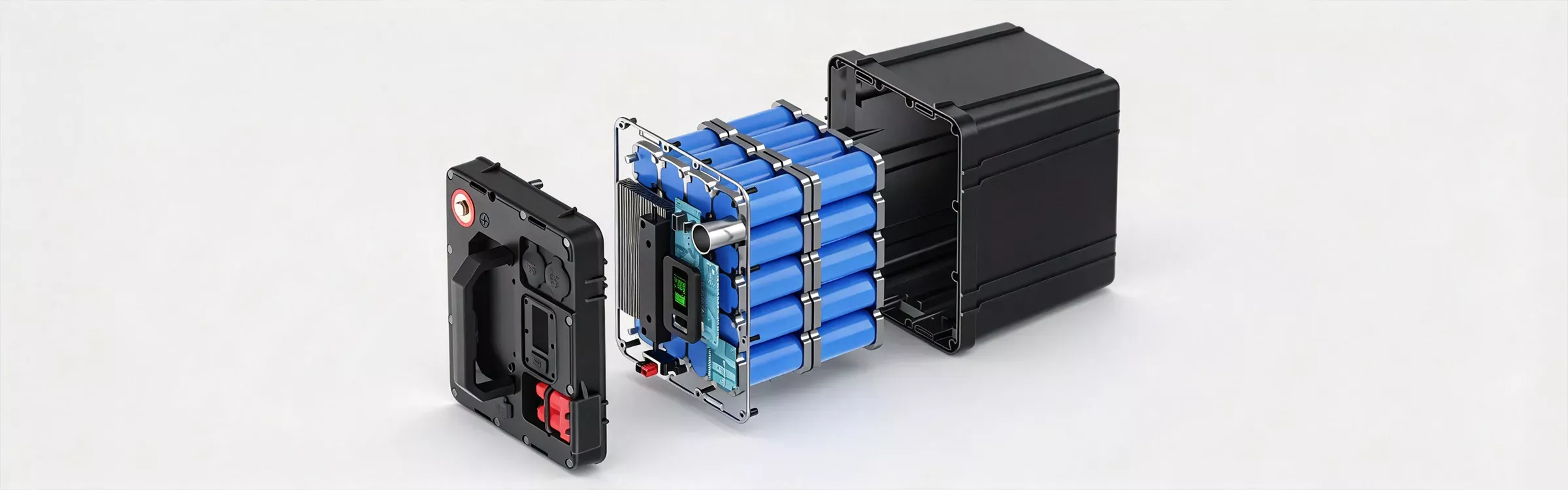
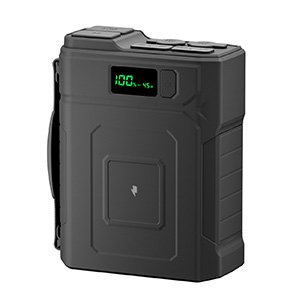
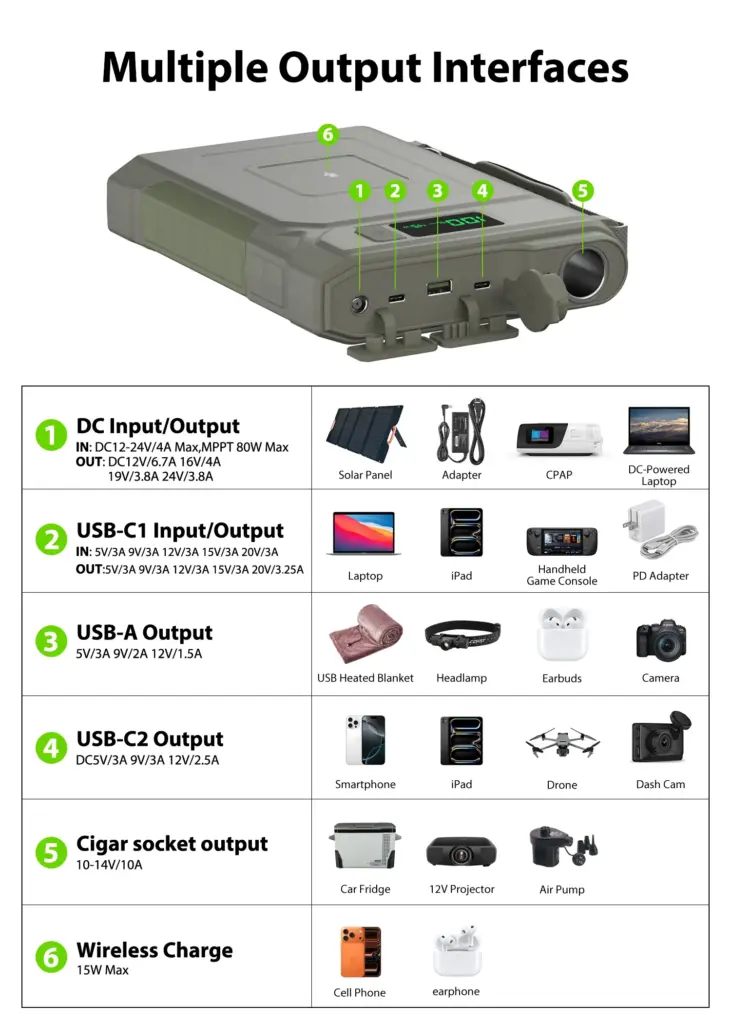
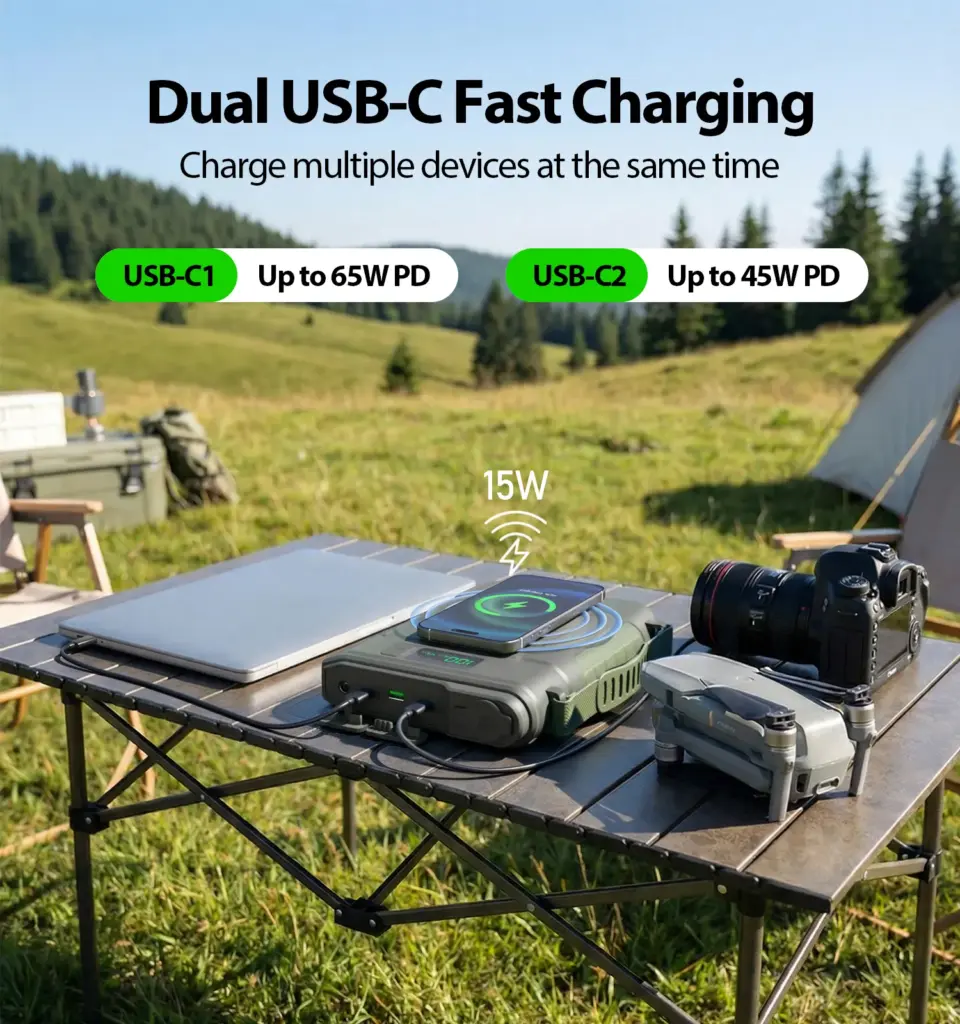
The Merpower GP35SE provides stored energy for compatible USB and DC equipment.
| GP35SE feature | Specification |
|---|---|
| Battery | 192Wh LiFePO4 |
| Pack capacity | 12.8V / 15Ah |
| USB-C1 output | Up to 65W |
| USB-C2 output | Up to 30W |
| USB-A output | Up to 18W |
| Cigar-lighter output | 10–14V / 10A |
| DC charging input | 12–24V / 4A, MPPT up to 80W |
Possible uses include charging a phone, compatible GPS device, camera battery charger, or rechargeable headlamp. Suitable low-power LED lighting may also be connected.
Check voltage, current, connector, charging method, and polarity where applicable. Individual port ratings do not establish that all ports can operate at maximum power together.
Keep Personal Backup Power Separate
The GP35SE can serve as a charging point near the vehicle or at suitable accommodation. Carry appropriate personal backup power or replacement batteries on the trail.
A battery left at the trailhead is unavailable if your headlamp or navigation device runs low before you return.
Choose where to keep the GP35SE according to its permitted temperature and environmental conditions. A cold parked vehicle should not automatically be assumed suitable for storage or charging.
Budget Power for Useful Tasks
Start with the devices and their expected use.
A simple relationship is:
Energy needed in Wh = Average power in W × Operating time in hours
For steady equipment, this provides an initial estimate. Charging phones and other batteries is less constant, so realistic measurements or manufacturer information can help.
The GP35SE’s 192Wh rating is nominal energy. Actual energy delivered to equipment is lower because of conversion losses and operating limits. Temperature and battery condition can also affect performance.
Prioritize:
- Communication and receiving updates
- Personal lighting
- Navigation equipment
- Cameras and optional devices
Preserve a reserve for a longer return or delayed departure. Test the planned equipment combination before the trip rather than relying on a theoretical runtime alone.
Solar can supplement charging when the panel and connection are compatible. Cloud, shade, positioning, and short winter days make it unsuitable as the only assured replenishment source.
Prepare for a Road Closure or a Short Power Cut
A delay can happen after the outdoor activity has finished.
Waiting for a Road to Reopen
Follow closure instructions and directions from officials. Do not bypass barriers or assume a suggested detour is safe in winter.
Carry water, food, blankets, extra clothing, and sufficient vehicle fuel or charge for the planned conditions.
The GP35SE may support compatible phones and small lights while waiting. That can help preserve communication, but it cannot make an unsafe location suitable or replace a decision to leave when directed.
Keep vehicle energy and accessory-battery energy in separate plans. A charged portable pack does not increase the vehicle’s fuel supply or driving range.
Losing Power at Accommodation
Contact the property operator first and establish whether the building remains safe and suitable to occupy.
Where Rocky Mountain Power supplies the property, use its outage map, app, or reporting service. Its outage and downed-line reporting number is 1-877-508-5088. Other service areas require the appropriate local provider.
A portable battery can support compatible communication and lighting during a short interruption. It does not replace building heat or a longer-term relocation plan.
Do Not Plan Around Electric Space Heating
Traditional electric heaters can require substantial power. The GP35SE should not be presented as a way to heat a vehicle or room through an extended winter wait.
Use appropriate clothing, blankets, shelter, and official assistance. Avoid using fuel-burning camping equipment inside a vehicle or enclosed accommodation to compensate for lost heat.
Cold-Weather Battery Use Needs Its Own Check
A battery that is working may still be outside the conditions permitted for charging.
Follow Separate Charging and Discharging Limits
Consult the GP35SE instructions for its actual operating limits. Do not apply another battery’s temperature range or assume that the product has an unspecified heating or low-temperature protection feature.
If the permitted conditions are unclear, confirm them with Merpower before travel.
Never force charging or use a flame, stove, or heat gun to warm the battery.
Keep Moisture Away Without Trapping Heat
Keep snow, water, and wet clothing away from ports and connections. Do not place the battery directly on snow.
Maintain ventilation during operation. Covering it with clothing or a sleeping bag can interfere with heat dissipation.
When moving cold equipment into a warmer space, check for condensation and follow the product’s instructions before connecting or charging it.
Inspect the Complete Setup
Look for damaged cables, loose plugs, moisture, and unusual heat. Stop using equipment that is damaged, swollen, leaking, or behaving abnormally.
Repeated shutdowns require investigation. Restarting repeatedly does not correct an unresolved overload or connection problem.
Turn Around While You Still Have Options
The original destination is less important than maintaining a safe return.
Set Limits Before Starting
Decide how weather, time, visibility, group condition, and route difficulty will affect the plan.
Turn back if you cannot identify the route confidently, equipment is inadequate, weather deteriorates, or progress is much slower than expected.
Do not spend the return margin trying to reach one more viewpoint.
Take Cold-Related Warning Signs Seriously
Persistent shivering, clumsy movement, marked fatigue, slurred speech, confusion, or unusual drowsiness need attention.
Reduce exposure and seek appropriate help. Serious symptoms require emergency medical assistance.
A functioning phone is useful for contacting help; charging it does not address the person’s immediate need for protection from cold.
Complete One Final Check Before Leaving
| Area | Confirm before departure |
|---|---|
| Journey | Current forecast, road status, restrictions, and parking |
| Route | Suitable terrain, navigation, and turnaround plan |
| Clothing | Layers, dry spares, and weather protection |
| Footwear | Appropriate boots and traction |
| Pack | Food, water, light, shelter, and first-aid supplies |
| Electronics | Charged devices, tested cables, and personal backup |
| Vehicle | Fuel or charge, waiting supplies, and secured equipment |
| Communication | Route and return plan shared with a trusted person |
Recheck conditions during the outing. A morning decision is not a guarantee that the afternoon will remain suitable.
Prepare for the Whole Winter Journey
A successful snowy trip includes reaching the trailhead, managing the walk, handling unexpected waiting, and returning safely.
Check road access separately from trail conditions. Dress for activity and stops. Match footwear to the surface, carry essentials with you, and set limits before problems develop.
The Merpower GP35SE can support compatible small electronics and lighting before and after the hike or during a short interruption. Its role is to supplement a complete preparation plan.
Before choosing a power arrangement, confirm device requirements, output compatibility, temperature limits, and expected use. Then test the setup while there is still time to make changes.
Frequently Asked Questions
What Should I Check Before Driving to a Snowy Trailhead?
Check the destination forecast, official road conditions, traction requirements, seasonal closures, parking, and trail access. Review avalanche information separately where relevant.
Does Clear Weather in Salt Lake City Mean Mountain Roads Are Safe?
No. Elevation, exposure, and local weather can produce different conditions. Check the actual route and destination.
Can a Walking Route Cross Avalanche Terrain?
Yes. Hikers and snowshoers can encounter avalanche exposure, including below steeper slopes. Route choice and appropriate knowledge matter.
What Is the Difference Between Traction Devices and Snowshoes?
Traction devices improve grip on suitable hard snow or ice. Snowshoes help reduce sinking in soft snow. Choose equipment for the route and conditions.
What Should Stay in the Car?
Extra supplies can support the drive and return, but essential trail clothing, navigation, light, food, water, and personal backup power should travel with you.
Can the GP35SE Charge a Phone, GPS, and Headlamp?
It can support compatible charging equipment within its output limits. Check cables, charging methods, and the permitted combination of loads.
How Does Cold Affect Portable Battery Runtime?
Cold can reduce usable energy and output capability. The degree depends on the battery, temperature, and load.
Can I Charge the GP35SE in Freezing Conditions?
Follow the exact charging-temperature specification. Do not assume charging is allowed because the battery can still supply power.
Can the GP35SE Run a Heater During a Closure?
Do not plan it as a source for traditional space heating. Its practical role here is compatible electronics and small lighting.
How Should I Check an Outage?
Identify the property’s electricity provider, then use its official reporting and status channels. Rocky Mountain Power does not serve every location.
When Should I Cancel or Shorten the Hike?
Change plans when access, weather, terrain, visibility, equipment, or group condition exceeds your preparation. Returning early is a valid outcome.