Does that mean something is wrong?Not necessarily. Some multi-port products redistribute their available power when another device is connected. The power available from one port during single-device use may differ from what it can provide while other ports are active.However, power sharing is only one possible explanation. The connected device, cable, charging protocol, battery level, and operating conditions also affect charging.Understanding these factors helps you choose a suitable power bank, arrange several devices, and recognize when slower charging needs further investigation.
Read the Power Ratings Before Counting the Ports
What a Single-Port Maximum Actually Means
A specification such as “USB-C: 100W Max” describes the port’s upper capability under the stated conditions. It does not mean every connected device receives 100W.Check whether that rating applies when the port is used alone or remains available in particular multi-port combinations.The device must also support a compatible charging option, and the cable must be suitable. A phone designed to accept less power will not charge at 100W simply because the source supports it.
Why Port Ratings Cannot Simply Be Added Together
Consider this
hypothetical example, which does not describe a specific Merpower product:
- USB-C1 supports up to 100W.
- USB-C2 supports up to 65W.
- The product’s combined output limit is 100W.
Adding the individual port ratings gives 165W, but that does not change the stated 100W combined limit.You would still need the manufacturer’s combination table to know how power is allocated when both ports operate. The total limit alone does not tell you the exact split.Some designs can maintain their individual port ratings simultaneously. Others share resources. Read the specifications for the actual product.
Input Power and Battery Capacity Tell Different Stories
Several numbers may appear on a power bank, but they describe different capabilities.
| Specification | What it describes |
|---|
| Input power | Power accepted to recharge the power bank |
| Single-port output | Output supported by a particular port |
| Combined output | Output permitted across specified active ports |
| Battery capacity in Wh | Stored energy, rather than simultaneous output capability |
A large battery does not automatically provide higher output power. Likewise, a high input rating does not prove that the same power is available to connected devices.
What Happens When Another Device Is Connected?
Some Ports Share a Power Budget
A multi-port power source has electrical and thermal limits. Its design determines how the available output is assigned.Some products use fixed allocations for particular port combinations. Others adjust the available power as devices are added or removed. Certain designs give one port priority or use different limits for different groups of ports.Power is not necessarily divided equally.Two devices connected to two ports might receive different available charging options because their requirements and the product’s allocation policy differ.
The Available Charging Options May Change
With USB Power Delivery, the power source offers supported power options, and a compatible device requests an option it can use.When another device connects, some multi-port systems revise those options and renegotiate the charging arrangement.Depending on the design, you may notice a brief change in the charging indicator or a short interruption. This behavior is product-specific; it should not be assumed for every charger or power bank.Repeated disconnects, persistent instability, or unexplained heating should not automatically be dismissed as normal power sharing.
Extra Ports Add Convenience, With Product-Specific Limits
More ports make it easier to connect different devices, but port count alone does not describe simultaneous performance.Before buying, find out:
- Which ports can operate together.
- What output each supported combination provides.
- Whether particular ports share a limit.
- Whether connecting or removing a device affects another port.
- Whether operation changes while the power bank itself is charging.
A clear combination table is more useful than several maximum wattage labels without context.
Why a Device May Charge Below the Available Power
The Device Chooses From Supported Charging Options
A capable source cannot force a device to consume its maximum available power.For compatible USB PD equipment, the source and device establish a supported charging arrangement. The device’s charging system then controls what it draws within that arrangement.A power source may therefore have unused capacity while a phone charges at a lower rate.Fast charging also depends on compatible protocols. A USB-C connector identifies the connection type, but it does not, by itself, guarantee a particular charging speed.
The Cable Must Support the Intended Charging Level
The cable is part of the power connection.Check its power capability and suitability for the intended equipment. Two cables with USB-C connectors may support different charging levels.A worn connector, damaged cable, or unsuitable adapter can also interfere with operation. Use a known compatible cable when checking unexpected charging behavior.A higher-rated cable can remove a cable limitation, but it cannot make the power bank or connected device exceed their supported capabilities.
Battery Level, Temperature, and Active Use Also Matter
Charging power can change during a session.Many devices reduce charging as their batteries approach full. Temperature management may also affect the rate. Comparing a nearly full phone with a low-charge phone can therefore produce misleading conclusions.For laptops and tablets, remember that incoming power may support operation as well as battery charging.A laptop running demanding software can use much of the incoming power. Its battery percentage may increase slowly—or decrease if operating demand exceeds the power available for the system.Distinguish between power entering the device, power used to run it, and power available to replenish its battery.
Choose a Charging Setup Around Your Real Devices
Laptop and Phone: Check the Laptop’s Needs First
If a laptop is central to your work, start with its charging requirements.Check the supported protocol and power options, then confirm what remains available from the chosen port when a phone is connected.Do not select a product solely because one port carries a high maximum rating. The relevant question is whether your intended combination supports the laptop’s needs.Also consider how you use it. Charging a sleeping laptop and powering one through a demanding work session are different situations.
Phones, Lights, and Cameras: Compatibility Comes First
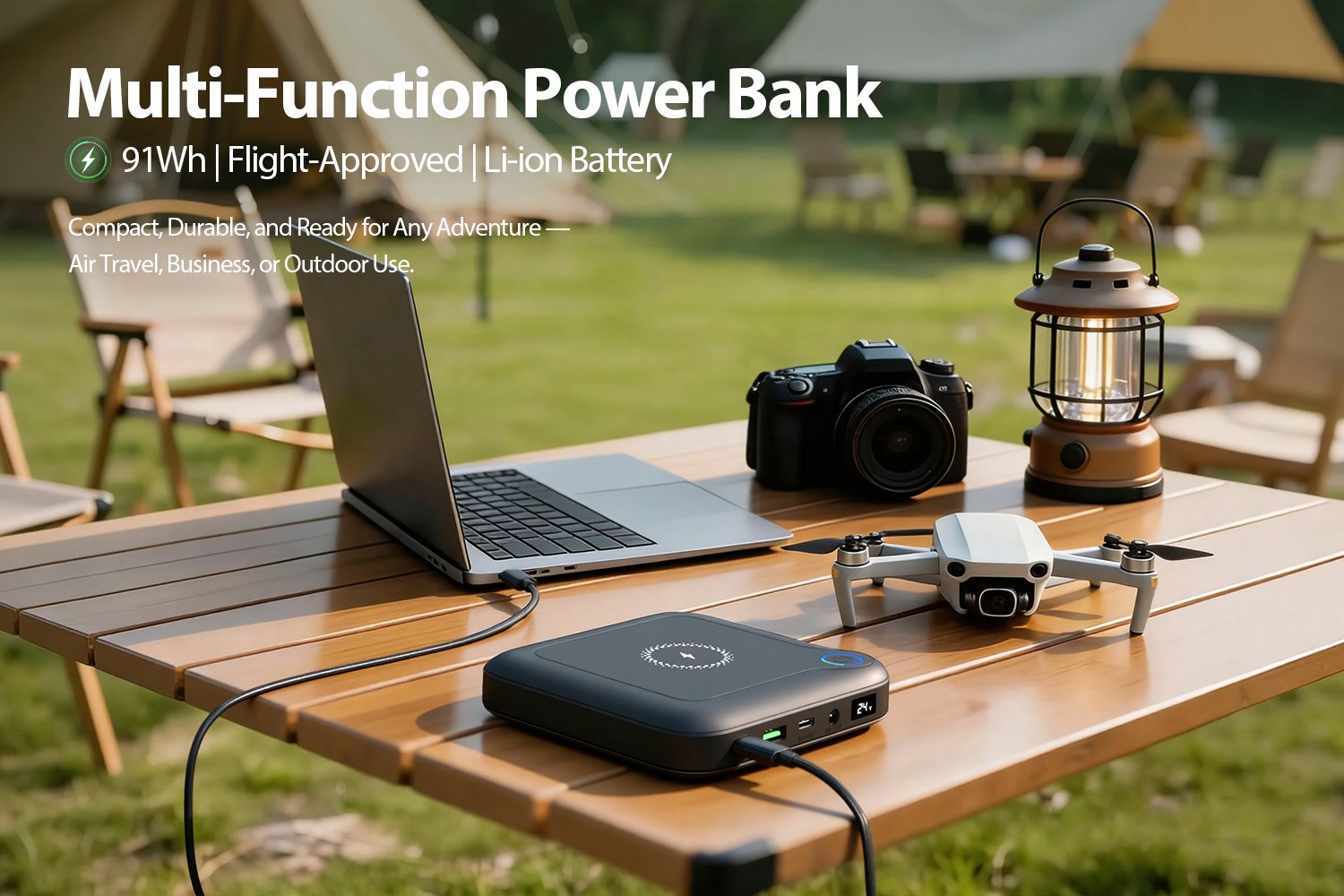
A camping setup may include several modest-power devices rather than one high-power laptop.Check each device’s charging method. A camera may need a separate charger, while a lantern may accept USB input directly.Very low-power accessories can have additional compatibility requirements, including whether the source remains active at their small demand. Consult the product instructions rather than assuming every USB device behaves the same way.
Match the Product to the Combination You Will Use
Use your expected arrangement as the basis for comparison:
| Intended combination | Main checks |
|---|
| Laptop and phone | Laptop port output during simultaneous use |
| Phone and tablet | Compatible protocols and combination limits |
| Phone, lantern, and camera charger | Connections, shared limits, and operating requirements |
| Several people sharing power | Device priorities, available ports, and charging schedule |
This approach keeps the purchase focused on practical performance.
Check Slower Charging One Step at a Time
Start With One Device and a Known Compatible Cable
Begin with one device connected to the appropriate port.Confirm that it charges as expected, then add another device. Observe whether the change occurs when a particular port or combination is used.This helps separate a multi-port allocation change from a problem with one cable or device.There is no need to open the product or experiment with improvised connections.
Compare Under Similar Conditions
For a useful comparison, keep device charge level, temperature, and workload reasonably similar.A laptop downloading files, running software, and powering a bright screen is not directly comparable with the same laptop asleep.On-screen estimates such as “time until full” can change with workload and charging conditions. They are not precise measurements of output power.If measurements are needed, use suitable equipment and a defined method. An inline meter must support the intended charging mode, and its reading still needs to be interpreted correctly.
Check the Manual Before Treating a Change as a Fault
Compare the observed behavior with the specified port combination.If the manual describes reduced output when several ports are active, slower charging may match the intended operation.Contact support when the behavior remains unexplained, devices repeatedly disconnect, or charging fails under a supported arrangement. Stop using equipment that shows damage, unusual smells, or unexplained persistent overheating.Useful support information includes the model, connected devices, ports used, cables, and whether the power bank was also being recharged.
What Buyers Should Ask a Manufacturer
Ask for a Port-Combination Power Table
For distributors and business buyers, individual port specifications are only part of the information needed.Request details covering:
- Single-port voltage, current, and supported protocols.
- Combined output limits.
- Output available in relevant port combinations.
- Shared restrictions between ports.
- Behavior when devices are connected or removed.
- Output behavior while the product is receiving charge, if supported.
Clear information makes it easier to explain the product accurately and recommend it for suitable applications.
Verify With the Intended Devices
A combination test should reflect the equipment customers expect to use.For example, a mobile-office application may require a particular laptop and phone combination. A camping application may prioritize lanterns, camera chargers, and low-power accessories.For Merpower product selection, discussing these combinations is more useful than relying on the largest wattage in a specification sheet. Any model-specific performance claim should be supported by confirmed specifications or appropriate testing.
Conclusion
Port count, single-port maximum power, combined output, and actual charging power describe different things.A multi-port power bank may adjust its output when devices share the available supply. Charging can also be limited by the receiving device, cable, protocol, temperature, or current workload.Choose around the equipment you plan to connect together. Check the combination specifications, test the arrangement before travel or work, and investigate behavior that does not match the product’s guidance.
FAQs
Can Every Port Deliver Its Maximum Power at the Same Time?
Only if the product supports that combination. Some ports share an overall limit. Check the manufacturer’s simultaneous-output specifications.
Why Does My Laptop Charge More Slowly When I Connect a Phone?
The source may reallocate available power. However, laptop workload, battery level, temperature, and cables can also affect charging. Compare the behavior with the specified port combination.
Does a 100W Power Bank Charge Every Device at 100W?
No. The device, source, cable, and charging protocol must support the relevant arrangement. Actual consumption may also be below the negotiated limit.
Can a USB-C Cable Limit Charging Speed?
Yes. The cable must support the intended power level and remain in good condition. Matching connector shapes do not guarantee matching capabilities.
Why Does Charging Briefly Change When Another Device Is Connected?
Some products update their power allocation and charging agreements. A brief change may be expected for that design, but persistent disconnects need investigation.
Does a Larger Battery Mean Higher Simultaneous Output?
No. Capacity describes stored energy. Simultaneous output depends on the product’s electrical design, supported modes, and operating limits.
What Should a Multi-Port Power Specification Include?
It should identify individual port capabilities, combined limits, supported protocols, and output for relevant port combinations. Any conditions affecting those ratings should also be clear.